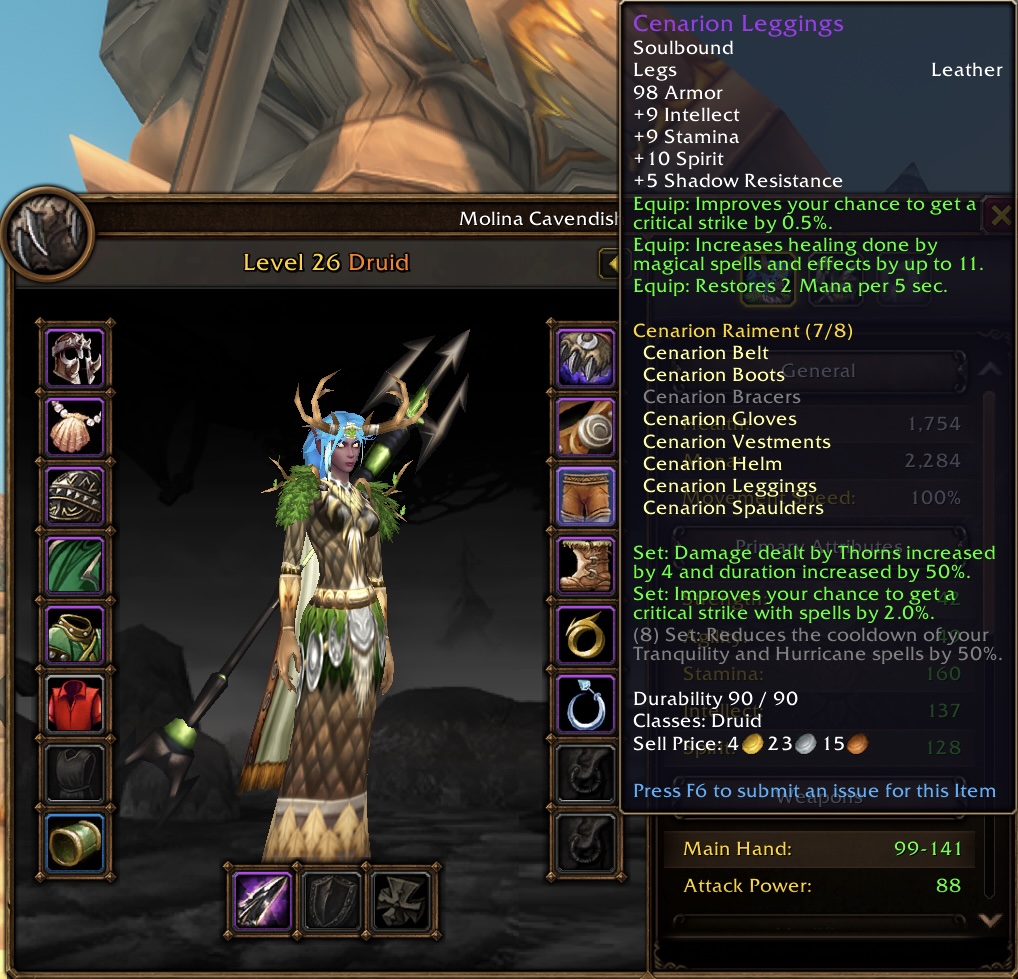
With a busy weekend dugnad(volunteer) work for my kids’ swimming club, Asker Grand Prix 2026, and some disturbing during last two weeks, I didn’t manage to upgrade to level 30 during WOW Forever beta test. Last night, friends notified me there is some event before closing. I logged in and got Cenarion Raiment suit(only missing bracers).

Code Browser in the AI Era — `sunerpy/codegraph-rust`
Code Browser in the AI Era — sunerpy/codegraph-rust
Yeah, the AI era is coming! Meanwhile, I still need to refresh my knowledge base—and my AI token budget is limited for all sorts of reasons.
AI-assisted coding (or, as some people call it, slop programming) is becoming very popular, at least in China. Perhaps one reason is that the cost is much lower there.
在鸿蒙设备上体验 Air 系列软件:Krita 与 Audacity 的 Qt/KDE 观察
最近看到 GitCode 上的 Air 系列软件项目,比较有兴趣。这个系列主要尝试将一些桌面开源软件移植到 HarmonyOS 上。
项目仓库:
我自己比较关注 Qt / KDE 应用在 HarmonyOS 上的移植情况,所以这次主要体验了 Krita 和 Audacity。
CelesMark X results for different HarmonyOS devices
CelesMark X, the first native HarmonyOS benchmark app across HUAWEI devices. Besides bench-marking, it can give Kirin/GPU/+ Model names alongside telling how native games will play on your device.
I have a few devices in hand, just list results here.
花粉症(花粉过敏) – hay fever(allergy to pollen)
顾名思义花粉症是因对花粉过敏引起的症状,是“过敏体质”的患者反复接触致敏花粉后,由机体免疫系统产生反应从而导致的一系列临床症状。主要表现在鼻、眼、咽部及支气管。典型症状为打喷嚏、流鼻涕、鼻痒和鼻塞,出现眼睛痒、流泪、眼红和灼热感,咽部会感到瘙痒、咳嗽,部分患者合并支气管哮喘、过敏性皮炎等疾病。症状的出现与花粉的地域和播散季节相关。
花粉过敏主要发生在春季,也会延续到夏季。
Acer Laptop has magic in BIOS settings
Got a Acer ConceptD 7 Ezel CC715-71P to install Linux and test touch screen on it. After booting from Ubuntu 23.10 USB, the installer told me that I need to deal with the Intel RST settings. Reboot, F2, enter the BIOS setup, but I didn’t find any option related.
Play Linux vms on M3 Max
Yeah, got a new work laptop recently, MacBook Pro 16″, M3 Max/36GB/1TB. But Asahi Linux is not ready for M3 yet.
And I have VMware Fusion, then I tried a few linux distributions with arm64/aarch64 support.
游泳比赛义务劳动
How to run ARM64(aarch64) Qt auto tests on x86_64
Assume you have a host(x86_64) build of qtbase, like following:
|
1 2 3 4 5 6 7 |
cd ~/qt git clone git://code.qt.io/qt/qtbase.git mkdir qtbase-build cd qtbase-build ../qtbase/configure -developer-build -opensource -confirm-license -nomake examples -nomake tests -verbose cmake --build . --parallel -j8 |
Some extra work to setup system:
Build Qt dev/5.15/5.12/4.8 on Ubuntu 23.10
Install Ubuntu 23.10, for me, it’s an VM via VMware Fusion 13.5.0 on MacBook Pro 2019.
Install some needed packages,
|
1 2 3 4 5 6 7 8 |
sudo apt install -y zsh build-essential perl python3 git sudo snap install cmake --classic sudo apt install ninja-build sudo apt-get build-dep qtbase-opensource-src sudo apt-get install libxcb-xinerama0-dev sudo apt-get install '^libxcb.*-dev' libx11-xcb-dev libglu1-mesa-dev libxrender-dev libxi-dev libxkbcommon-dev libxkbcommon-x11-dev sudo apt-get install libdbus-1-dev libglib2.0-dev |
Default gcc/g++ is 13.2.0.
Add following in env:
|
1 2 3 |
export MAKEFLAGS='--jobs=8' export CMAKE_GENERATOR=Ninja |