更新:
2020年8月26日 Fring Is Dead Now: Try These 10 Alternatives In The Absence
解决了 Nokia E90 上用 WIFI 打 Skype 的问题了
2 Replies
更新:
2020年8月26日 Fring Is Dead Now: Try These 10 Alternatives In The Absence
[How to] Reflash your Nokia E90 with a different firmware/language pack
How to (re)flash your Nokia E90 with a different firmware/language pack.
Because I see this question popping up more often and I now even got a PM about this subject, I decided to post a quick How-To about reflashing your Nokia E90 to a different language version.
First of all you will need to download and install the Nokia PC Suite.
You will need this program to 1. make a backup of your phone and 2. you will need it for the USB drivers.
The Nokia PC Suite page can be found here: Nokia PC Suite page
You can find a direct download to the latest version 6.84 here: Nokia PC Suite 6.84
Now we will install the Nokia Software Updater (NSU) to flash the new firmware to your phone.
you can download the NSU program from this page: Nokia Software Updater
You can find a direct download to the latest version here: Nokia Software Updater
You can check for the availability of a new firmware on this page: Firmware Availability
In case of a Nokia E90 with a product code from Singapore (0544485) you can see that currently the latest firmware is version 07.24.0.3
Finally you will need to download and install the Nemesis Service Suite.
You can find more info about the NSS on the following page: Official NSS Page
Download and install the NSS for this direct link (Version NSS103812): NSS103812.zip
Unzip and Install, you can choose any option but the Virtual USB drive should be okay.
Notice: Without the Nokia PC Suite the NSS will not detect your Nokia phone! Always install the Nokia PC Suite first!
[I do not include screenshots for the following steps, if required PM me ]
Step 1.
Connect your Nokia E90 with the included USB cable and select “PC Suite” as the selectable mode.
Step 2.
Let the Nokia PC Suite detect your telephone and let windows install the required drivers.
This might take a few seconds.
Step 3.
Fire up the Nemesis Service Suite Program.
Step 4.
When in the main program, click on the “scan” button in the top-right of your screen. (the magnifying glass button 😉 )
Step 5.
After NSS detected your phone without errors, click on the “Phone Info” button.
Step 6.
Look for the “Product Data Edit” section to the right of your screen and click the “Read” button to read the current values of your Nokia E90.
Step 7.
You can now enable the “Product Code” line and alter your current Product Code to the required Product Code.
Step 8.
Click on the “Write” button to write the new value to your Nokia E90.
Step 9.
You can now close the NSS and continue by opening the Nokia Software Update program.
Step 10.
Go through all the steps of the NSU program and finally update your firmware.
Currently the firmware for the EMEA and APAC region are the same version except they of course contain different languages and such.
Because of this you might be asked by the NSU program is you really want to reflash your current firmware.
You must click yes or you will end up with the wrong firmware once more.
Note:
If you bought your Nokia E90 in the UK you will have the same keyboard layout as the APAC version.
I verified this with my own Nokia E90 which is a UK EMEA 1 version.
For a picture of the APAC keyboard you can click here.
I altered the product code of my own Nokia E90 from a UK EMEA 1 model to an APAC Singapore version.
From:
0514979: EMEA 1 – UK red
To:
0544485: APAC Singapore – Colour unknown
The EMEA 1 model has the following languages:
English, Dutch, Russian and a 4th language (Either Turkish or Spanish)
I currently have the following languages:
English, Simplified Chinese, Melayu, Indonesian
Remember that when flashing to a different region, you may loose certain pre-installed region specific programs.
In my case I gained a Chinese-English-Chinese dictionary
I will post a list with known product codes for the Nokia E90, both EMEA and APAC in a follow up post.
If you have any questions, advice, comments or just want to flame…. let me know
Nokia E90 Product codes:
Known Asian product codes:
0544491: APAC Honk Kong – Colour/version unknown (No Chinese)
0544485: APAC Singapore – Colour/version unknown
0546002: APAC Indonesian – Red
0546003: APAC – Colour/Version unknown (Might be Singapore too as they both have the same language pack)
Known EMEA product codes:
0514979: EMEA 1 – UK red
0533332: EMEA 1 – UK mocca
0544294: EMEA 1 – South Africa mocca
0545983: EMEA 1 – South Africa red
0544295: EMEA 2 – Scandinavian1 mocca
0545986: EMEA 2 – Scandinavian1 red
0545807: EMEA 3 – Scandinavian2 mocca
0545988: EMEA 3 – Scandinavian2 red
0546493: EMEA 4 – Red …
0544297: EMEA 4 – Mocca …
0544351: EMEA 5 – German mocca
0545990: EMEA 5 – German red
0548270: EMEA 5 – German red (SWAP)
0552044: EMEA 7 – France Native red
0552045: EMEA 7 – France Native mocca
0544356: EMEA 8 – Spain mocca
0544380: EMEA 9 – Turkey mocca
0546526: EMEA 10 – Czech mocca
0550193: EMEA 10 – Czech red
0544383: EMEA 11 – Greece mocca
0546435: EMEA 12 – Hungary mocca
0544384: EMEA 13 – Poland mocca
0545995: EMEA 14 – Russia red
0544388: EMEA 14 – Russia mocca
0544393: EMEA 14 – Ukraine mocca
0545997: EMEA 15 – Italy red
0544403: EMEA 15 – Italy mocca
0545999: EMEA 16 – Arabia1 red
0544406: EMEA 16 – Arabia1 mocca
休假结束了,我也 Nokia 了。
NewSMTH的棋道版置顶文章:[整合]XQStudio_1.63版及源代码
有兴趣的朋友可以学习学习了,hoho。
今天读到 Daniel Molkentin (danimo): Dear Google Earth Team…,才发现 Google Earth 4.3已经使用 Qt 4 了,hoho。
终于看完了这本书。
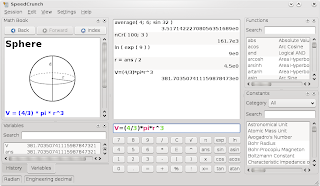
应同事之邀,翻译了他和其他人的一个 Qt 4 开源软件 – SpeedCrunch,在此感谢 Shawn Ma 同学的帮助。不过据目前调查,国内好像不能访问这个软件的网站,很是奇怪,不知道为什么。大家可以去这里看看。
国际上其它国家不让中国人随便去,如果这个问题解决了,估计其它问题就都解决了。
七年之前的这个时候,已经下班找公司公寓安排住处去了。
七年之后的这个时候,一会儿就可以吃午饭了,还有半天才能下班。